|
New Features for CMD 2011
Here are a few of the things we have either finished already or have in the works for CMD 2011:
Church Directory Enhancements: There’s a completely new church directory format called Customized Format Setup. Unlike Formats A, B, and C which use parameters scattered around the Print Control page, the Customized Format Setup dialog provides direct access to all its parameters on this one dialog. In addition, we’ve added a number of additional functions to allow you to create just the right church directory format for your needs. Here’s a screen grab of the dialog:
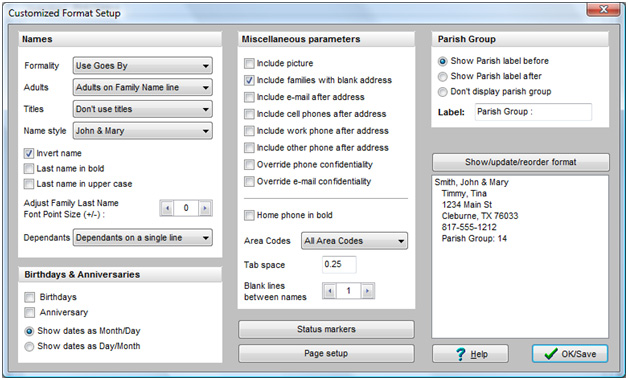
Notice all the parameters you can adjust. There’s new capability for both displaying both adults and dependants. Here’s a view of both these menu drop down options:
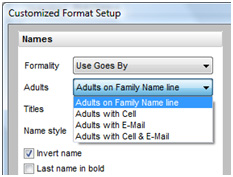 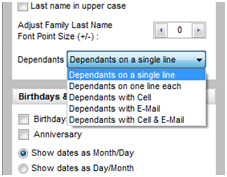
You now have more control over where and how the names are printed along with additional information such as adding cell and/or e-mail for each name.
Also new, there’s a section in the upper right corner of the Customized Format Setup dialog called Parish Group. This is a new field in CMD 2011 used for assigning congregational families into parish groups, and we’ve included it as an option that can be included in your printed church directory.
In the lower right corner of the dialog, you’ll see a button labeled Show/Update/Reorder Format with a small memo box below it. When you click this button, the memo box will display a sample of the directory format you’ve defined based on your selected parameters.
But there’s more! You can use your mouse to drag and drop the directory items to rearrange them so that you can print the items in whatever order you wish! This adds a lot of functionality to the whole process of printing your directory.
Still more…you can now adjust the font size on the family name field to make it stand out more, you can print your directory in 3 columns, and now you can make the phone number bold as well.
Output Forms Menu: I’ve had many requests to alphabetize the Output Forms menu to make items easier to find. Here’s what it looks like now:
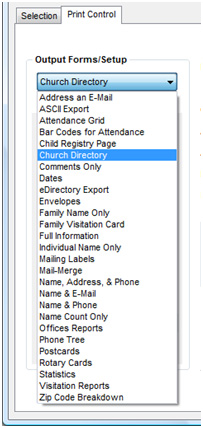
If you look closely, you’ll see a new Output Form, too. It’s the very first one: Address an E-Mail. This will simplify creating a bulk e-mail within CMD to any group you select.
Enter/Modify/Delete Names: We’ve made a number of subtle but helpful improvements on the Enter/Modify/Delete Names dialog. Here’s what it looks like now:
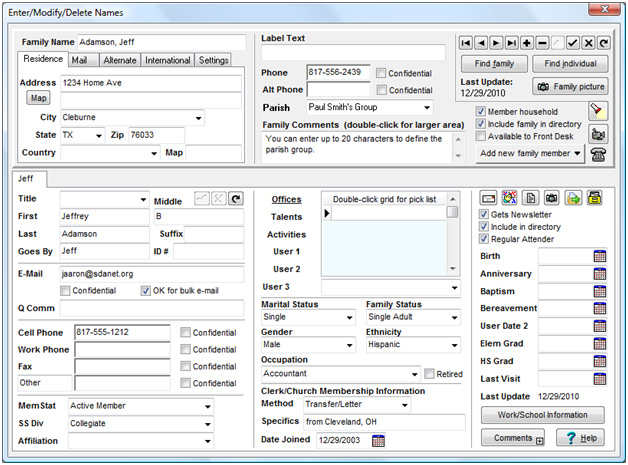
Here are the changes to note:
- The new Parish field follows the Alt Phone field. It’s user-definable like CMD’s other menu fields.
- We’ve moved the icons for Find, Video Training, and Hot List over to the far right edge of the Family Data area.
- We’ve added a new field in connection with the Email field since more and more of you are wanting to include e-mail addresses in your church directory. I added a Confidential field for e-mail to maintain privacy when it’s requested. I also expanded what used to just say “OK” beside the e-mail field to say what it really means: “Ok for bulk e-mail” so CMD will know to include this name in group/bulk e-mails when you are creating such a mailing in Print Names.
- Notice the row of icons in the upper right corner of the Individuals Data area. They are, in order: Print Envelope, Reorder Family Members’ tabs, Print Family or Individual Profile, View a picture of the individual, Move the name to their own new family, and File Information. The File Information button is there to help us quickly see some raw file information when needed, and also gives you access to more new fields I’ve added that track the date a family or individual was first added to CMD as well as the user name of the person doing the entry.
- While I haven’t done it yet, I’m hoping to add a feature that will detect if a new family you are attempting to add to CMD already exists in your file. This feature may not make 2011.1, but I do plan to add it sometime this year.
Other New Fields
Web Access Fields: I’ve also added several new fields that will be important as I begin to provide some optional web access functionality. There are fields will make it possible (at your option) to allow your members to view their own basic data record on-line and send you changes and updates if needed. There are also fields you will be able to set which will allow for users to be able to look up other church members (church directory information only), as well as a field that will let you protect any given member’s church directory information from being viewed by others.
And of course, we have added additional password fields to provide the necessary protection so that only authorized church members will be able to access their own or others’ information. I’ll provide more details about the potential of optional web access as things develop. There are a number of connection, licensing, and hardware-related issues we’re still working on to make web access available at the most reasonable cost possible.
User Barcode Field: One more new field has been added that will let you define a number for the purposes of tracking attendance by barcode. Currently CMD’s barcode reading process in attendance simply tells CMD to look up the internal record number for the individual being marked for attendance. Now you will be able to define the barcode number that is used to mark an individual in case your process or event using pre-printed barcode forms or cards. A separate dialog will allow you to easily connect a barcode number with any individual in your CMD data file.
Attendance Changes
There are a number of additional functions we’re adding to attendance tracking this year. We’re expanding the “kiosk” capabilities of CMD which allow members or guests to step up to a computer and mark their own attendance and/or print a name tag.
Prior to 2011, members/guests could use a function that allowed them to enter the last four digits of their home phone number. This year they will be able to also enter the last four digits of their cell phone number, or simply their name.
These changes, along with the user-defined external bar code number you can enter will greatly enhance CMD’s ability to track attendance and/or print name tags in virtually any situation.
Early Update Discount (applies to registered CMD users only)
Update to CMD 2011 by January 31, 2011, and get a $10 discount off your update order. That means the download version will be yours for only $79.95, and the CD version is only $129.95. All prices are in USD. Orders outside US/Canada add $10 for CD updates.
After January 31, 2011, our new support/update costs will be applied to all users (see below). But all users may order a CMD update at the Early Update Discount price until then.
Support/Update Costs Changes
We are making some significant changes to our update cost policies starting February 1, 2011. These are the first such changes in 14 years.
Here are the details:
Annual Early Update Discount: After January 31, 2011, only users with the most current prior version of CMD will qualify for the early update discounts we will continue to offer each January. However, because we are making changes to our support & update costs policies, we are offering the Early Update Discount to ALL users this year, regardless of the version you now own until January 31, 2011!
Support/Update Costs after January 31, 2011
CMD 2009 & 2010 users’ update prices: $89.95 (download) $139.95 (CD)
CMD 2008 users’ update prices: $99.95 (download) $149.95 (CD)
CMD 2005 & 2006 users’ update prices: $129.95 (download) $169.95 (CD)
CMD 2004 and older versions users’ update prices: $189.95 (download) $229.95 (CD)
These update prices are for US/Canadian users. International update orders on CD, add $10.
Once again, these changes take effect after January 31, 2011, so if you have an older version of CMD that you’ve put off updating, this is the only time you will be able to get it for the lowest price of $79.95 (download) or $129.95 (CD).
So…take advantage of the good price all users can get for CMD 2011 by ordering before January 31, 2011!
|